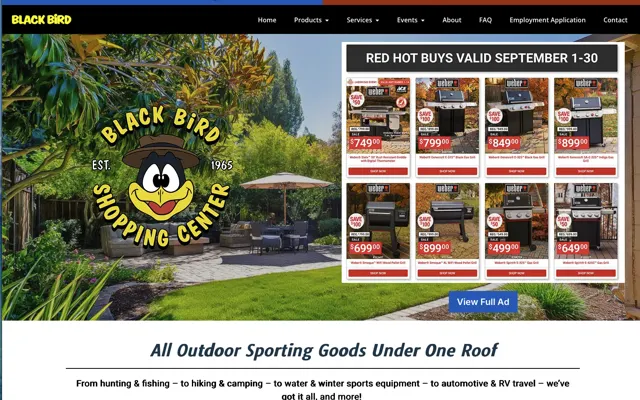
Do: Use Standard Layouts
Think about walking into a familiar grocery store. You know where the milk, the bread and the checkout are. Visitors arrive at your website with the same expectations: the logo in the top left corner or the center, the menu across the top.
Originality is great, and the web has a few unwritten rules people are comfortable with. Following them keeps visitors oriented.
When you set up your layout:
- Ensure your logo, menu, and other key information are easy to find.
- Stick to familiar paths, so visitors move around your site without thinking about it.
Do: Keep It Simple
Everyone is in a hurry. People enjoy finding information, and they want it now. The simpler your website, the better.
Keep each page easy to understand at a glance, in plain words everyone knows. A simple website feels inviting. It welcomes people in and encourages them to stay a while.
Do: Stay Focused
Your website is a tool with a purpose. Maybe you want sales, sign-ups, or phone calls. Whatever the goal, your website should lead visitors toward it.
Decide what you want your website to do, then build every element to support that goal. The colors, words, images and layout should all lead visitors down the same path, like a trail of breadcrumbs to your front door.
Do: Be Consistent
Your website is an extension of your brand. It should reflect who you are, and do it consistently across colors, fonts, styles and tone of voice.
Picture your website as a person. Someone whose personality keeps changing is confusing. Someone consistent is easy to understand and trust. Keep your design and message steady, and your website becomes easier to use and easier to remember.
Meade Construction Shows the Work Before the First Meeting
Ross and Emily Meade build custom homes. Their website puts each finished project in its own gallery with the homeowner’s review, so a prospective client can see the quality of the work before they call.
Screenshots captured September 17, 2026.
The portfolio does the selling
Every finished home becomes a page a future client can browse before the first meeting.
See the Meade Construction & Design project →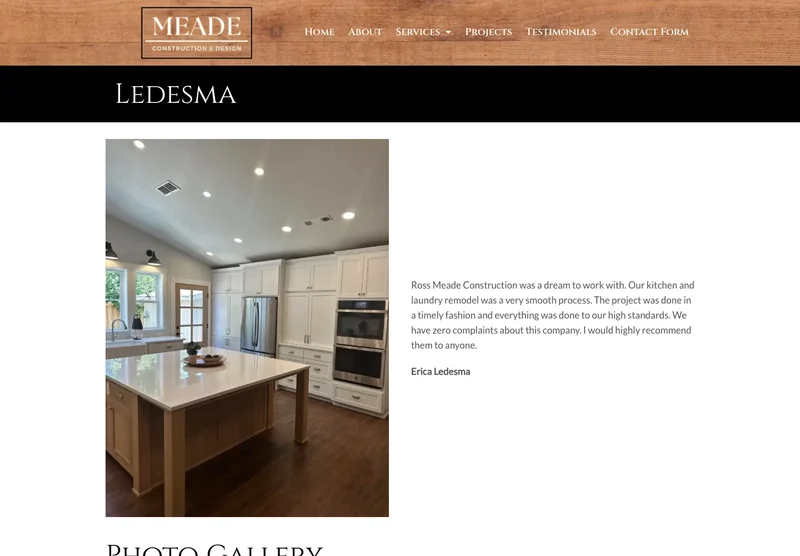
Do: Make It Look Good
Looks matter. Your design sets the stage for everything that follows, and first impressions count.
Make your website neat and professional. Choose colors and fonts that reflect your brand and appeal to your audience, and use high-quality images. Your website represents your business online, so make it a good representative.
Don’t: Cover Up Your Content
Content is king online. It’s how you explain who you are, what you do, and how you can help.
Some websites hide their content behind pop-ups and sign-up forms, which feels like being interrupted in the middle of a conversation. Let visitors read your content first, and ask them to sign up once they’re interested.
Do: Invest in Your Content
Your content connects you with your audience. It’s your chance to show your expertise and earn their confidence.
Writing content can be a challenge, and it is one of the most important parts of your website.
Content is how you help visitors solve their problems and how you persuade them to take action. Take the time to create quality content, because it drives your website’s success.
Do: Keep It Fast
People want their information fast. When a website is slow, they leave and find what they need somewhere else.
Speed covers both how fast your pages load and how quickly visitors find what they came for. Make your website quick to load and easy to navigate.
A website that works takes time, effort and an understanding of your audience. Keep these do’s and don’ts in mind and you’ll be on the right track. If you’d like help putting them into practice, call or text me at (541) 226-8087.
What Fast Looks Like on a Phone
These are Google PageSpeed Insights results for two websites we built. Russco Enterprises is an excavation company in Douglas County. Oregon RV Outlet is an RV dealership in Grants Pass with a photo-heavy inventory.
Russco Enterprises · Mobile
Google PageSpeed Insights, August 2, 2026
Oregon RV Outlet · Mobile
Google PageSpeed Insights, September 11, 2026
Individual homepage laboratory tests; scores can change between runs. Both sites scored 100 for desktop performance. See the Russco project · See the Oregon RV Outlet project

I run Good Creations in Grants Pass. I work directly with business owners on website design, content, and search. My work includes service writing, inventory websites, and custom publishing tools.
Meet Bob